
Reporting, permissions and the audit record
The parts that are not a module: the reports every module contributes to, the roles that decide who sees a salary, and the record of who changed what — plus the Enterprise line items that are delivered by an agreement rather than by a screen, said plainly.
What platform actually does.
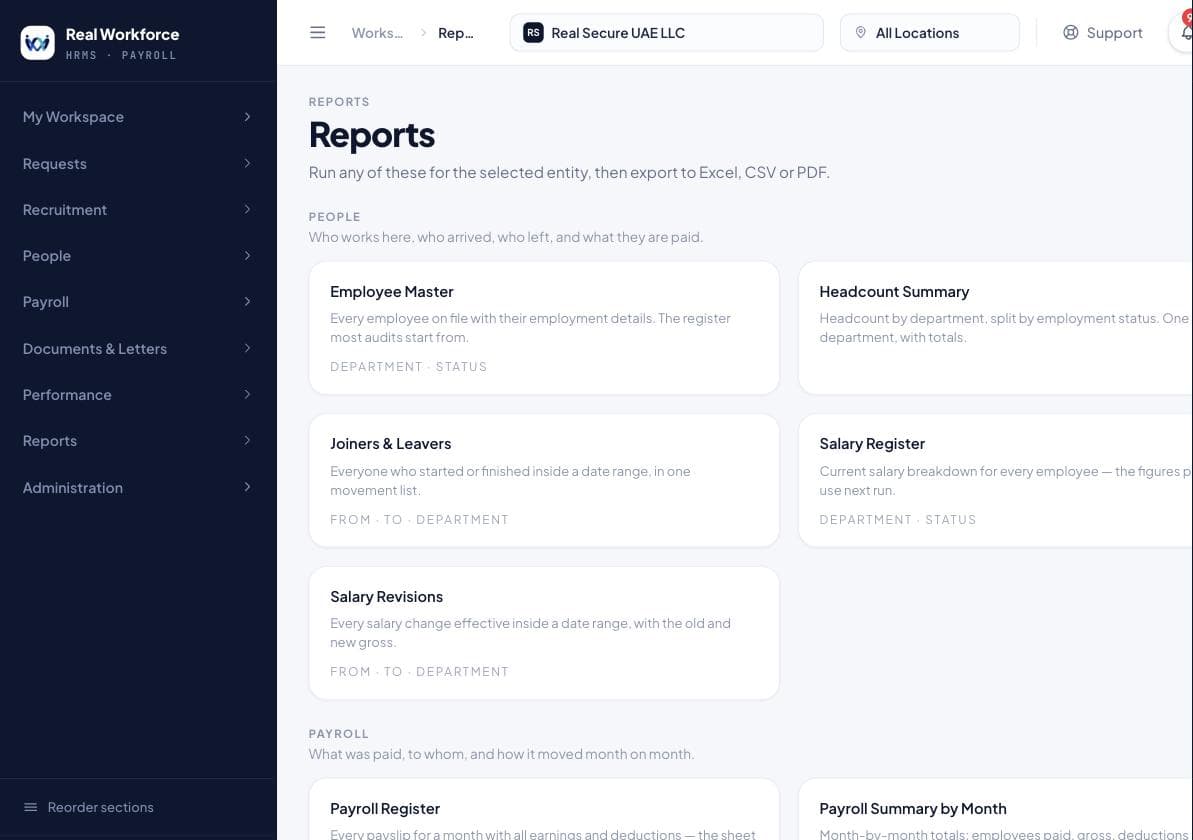
Reporting across every module
Reports are grouped by subject — People, Payroll, Leave, Compliance and Performance — and every one of them runs against your own scope. A user scoped to one entity gets that entity's figures, from the same report a group HR manager runs across all of them.
- Headcount, joiners, leavers, salary and structure across the people you can see
- Payroll cost by period, by department, and month on month
- Leave entitlement, absence and the leave register
- Compliance dates that need acting on before they pass
- Performance completion, overdue reviews, score distribution and history
- CSV, Excel and PDF from the same export, authenticated and permission-checked
Roles, permissions and entity scope
Permissions are per action rather than per screen, roles collect them, and a user's reach is further limited by the legal entities they are given and the team that reports to them. The interface is never the check — every route asks again.
- Roles built from individual permissions, not fixed job titles
- Entity access per user, so a subsidiary's HR sees a subsidiary
- Manager reach that follows the reporting line
- Compensation kept as its own permission, separate from everything else
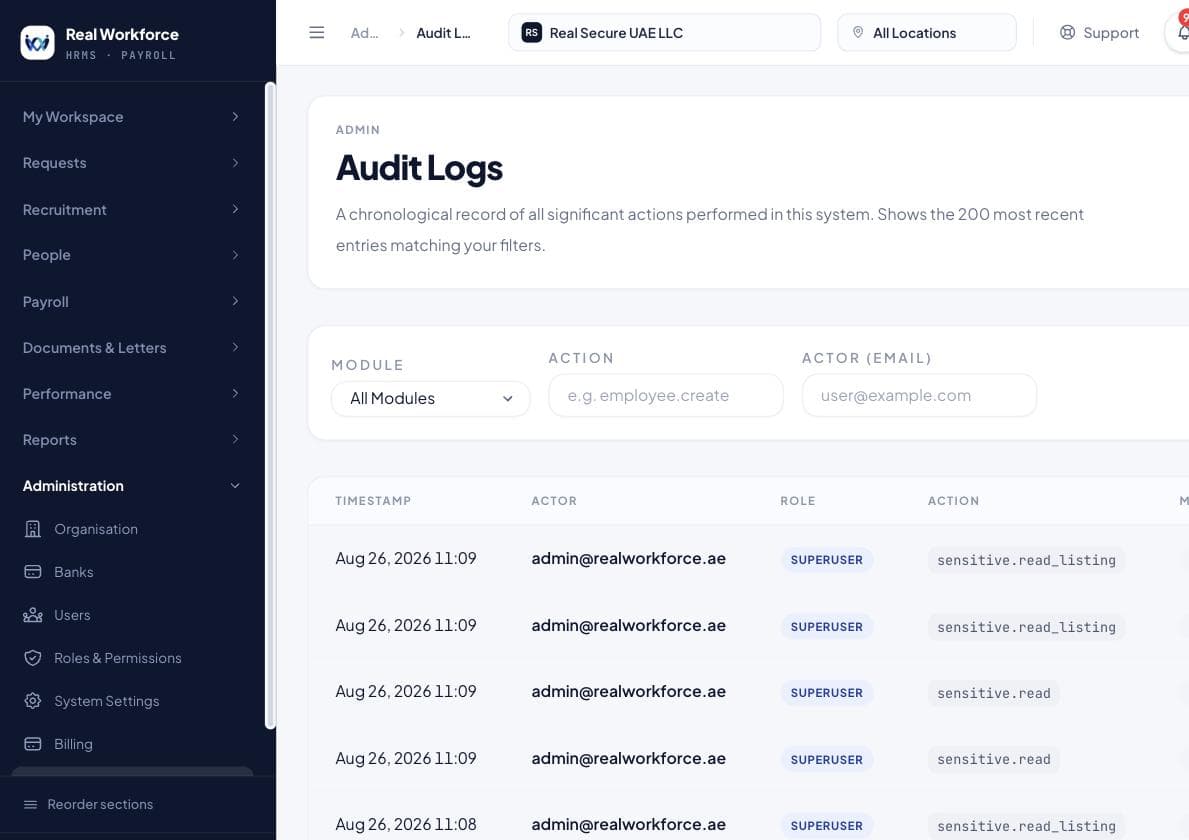
The audit record
Business-significant changes are written to an append-only record in the same transaction as the change itself — so a change that was made was recorded, and a recording that exists describes something that happened. The application can add to it and cannot alter it.
- Who, what, when and the before-and-after values
- Written in the same transaction as the change, so the two cannot come apart
- Append-only to the application; a row cannot be edited or deleted through the product
- Sign-in history and session records alongside the business changes
Custom approval workflows
Approval chains defined to your structure rather than to the product's defaults. Sold with an Enterprise agreement and scoped in that conversation — today the product's approval routes follow the reporting line and the permission set, and anything beyond that is work we agree before you sign, not a switch waiting to be turned on.
- Scoped and priced as part of the Enterprise agreement
- Today's behaviour: approvals follow the reporting line and role permissions
Consolidated group reporting
One figure across every legal entity in a group. An Enterprise line item: the reports today run across the entities a user is scoped to, which covers most of what is meant by this, and anything further is agreed in the contract rather than assumed from this page.
- Sold as part of the Enterprise agreement
- Today's behaviour: every report runs across all entities a user is scoped to
API and integrations
Programmatic access and integration with the systems you already run. There is no published public API today. What this buys is an integration agreed and built as part of an Enterprise engagement — which is a real thing we sell, and not the same thing as a documented endpoint you can call this afternoon.
- Scoped and delivered as part of the Enterprise agreement
- No public API documentation today; do not plan an integration on the assumption of one
Single sign-on
Sign-in through your own identity provider. Sold with Enterprise and delivered as part of that engagement. Sign-in today is a password with multi-factor authentication available; if SSO is a requirement rather than a preference, raise it before signing.
- Scoped and delivered as part of the Enterprise agreement
- Today's behaviour: password sign-in, with multi-factor authentication
Priority support
A named contact and a response time written into the contract, rather than a queue. This one is delivered by people and paper by definition — there is no feature behind it and we are not going to pretend otherwise.
- A named contact rather than a ticket queue
- Response times in the contract on Enterprise; priority handling on Premium
What it looks like.
Captured from a running system, not drawn for this page.
What each tier includes, from the live price list.
This table is read from the same plan catalogue the billing system enforces, so it cannot disagree with what your subscription actually allows. Ceilings and prices are on the pricing table.
| Capability | Starter | Professional | Premium | Enterprise |
|---|---|---|---|---|
| Reporting across every module | Not included in Starter | Included in ProfessionalLimited | Included in Premium | Included in Enterprise |
| Roles, permissions and entity scope | Not included in Starter | Not included in ProfessionalStandard | Not included in Premium | Included in Enterprise |
| The audit record | Not included in Starter | Not included in ProfessionalStandard | Included in Premium | Included in Enterprise |
| Custom approval workflows | Not included in Starter | Not included in Professional | Included in Premium | Included in Enterprise |
| Consolidated group reporting | Not included in Starter | Not included in Professional | Not included in Premium | Included in Enterprise |
| API and integrations | Not included in Starter | Not included in ProfessionalAdd-on | Not included in Premium | Included in EnterpriseFull |
| Single sign-on | Not included in Starter | Not included in Professional | Not included in PremiumOptional | Included in Enterprise |
| Priority support | Not included in StarterStandard | Not included in ProfessionalStandard | Included in PremiumPriority | Included in EnterprisePriority + SLA |
Prices, employee ceilings and monthly allowances are on the pricing table. Enterprise is quoted against your group rather than published.
What this does not do.
Worth an awkward paragraph here rather than an awkward call in month two.
- There is no public API and no published integration documentation. API access is an Enterprise engagement, not an endpoint.
- Single sign-on is not available as a self-service setting on any plan.
- There is no report builder. Reports are a maintained set that grows with the product; a new one is a release, not a screen you configure.
Straight answers.
Can another customer's data ever reach ours?+
No. Every company using the product is separated at the database itself — the isolation is a property of how the data is stored rather than a filter a query has to remember, and it is tested on every table on every build.
If we stop paying, do we lose our records?+
No. A workspace with an overdue payment becomes read-only. Everything stays visible and every report still exports. Nothing is hidden to make a point.
Every other part of the product.
Half an hour, your numbers, no slides.
Tell us how this runs for you today. We will show you the same process here and be honest about what it would take to move.